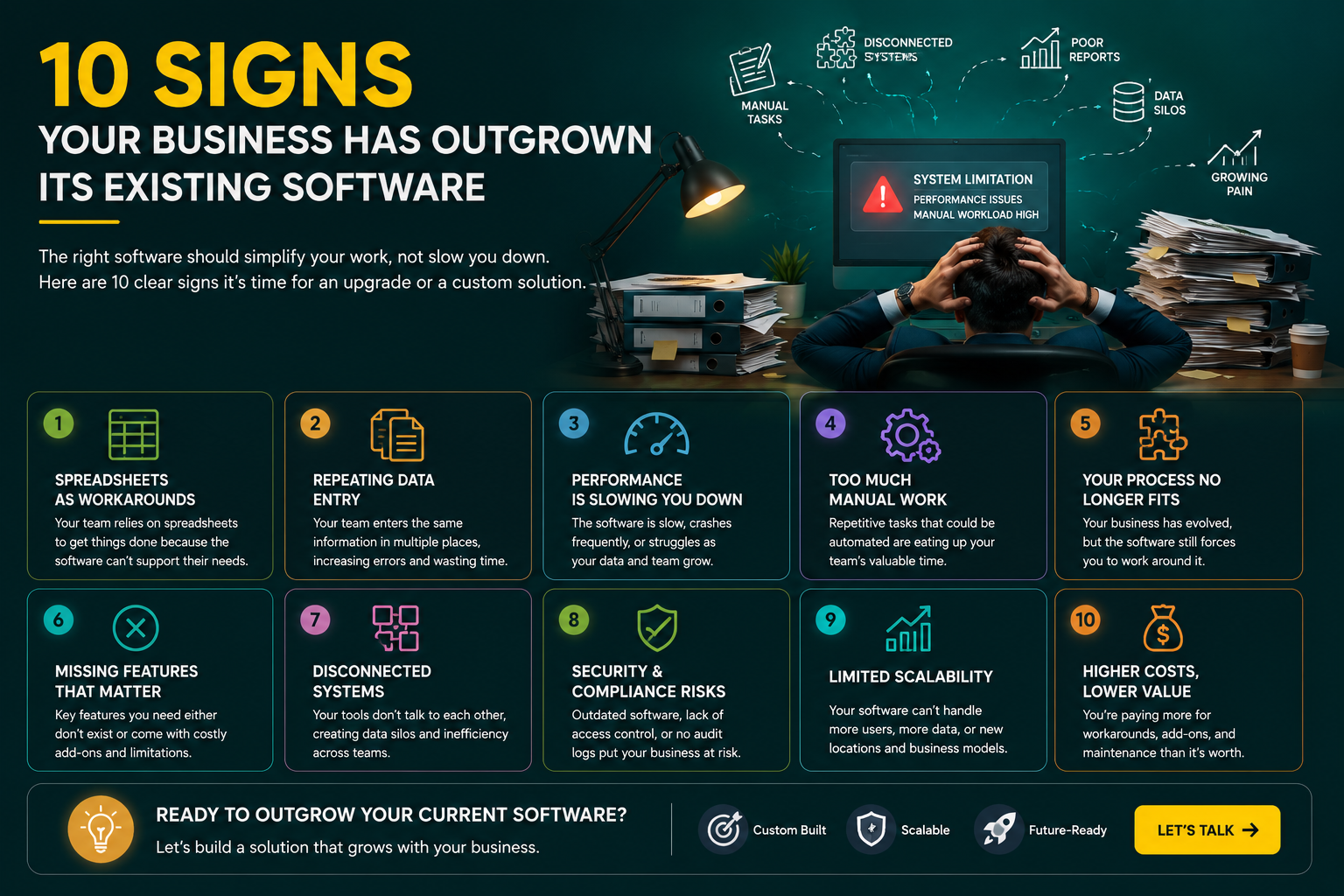
10 Signs Your Business Has Outgrown Its Existing Software
The software that helped your business get started isn't necessarily the software that will help you grow.
When a company is small, a basic CRM, spreadsheet, accounting tool, or off-the-shelf business application can be perfectly adequate. There aren't many users, the processes are relatively simple, and everyone knows how things work.
Then the business grows.
More employees join. Customers increase. New departments appear. Different teams start using different tools. Someone creates a spreadsheet to work around a limitation. Another person starts manually copying data from one system into another.
Eventually, the software that was supposed to make work easier starts creating more work.
This doesn't always mean you need to throw everything away and build a new system.
Sometimes a configuration change, integration, upgrade, or maintenance project is enough.
But if you're seeing several of the signs below, your business may have reached the point where it's worth seriously looking at software modernization or custom software development.
1. Your Employees Are Constantly Using Spreadsheets as Workarounds
Spreadsheets aren't the problem.
They're useful tools, and most businesses rely on them in some way.
The warning sign is when employees need spreadsheets to compensate for something your main business software cannot do.
For example, your CRM might not provide the report your sales manager needs, so someone exports the data every Friday and builds a separate spreadsheet.
Or your operations team might maintain a spreadsheet because the existing application doesn't support the workflow they actually use.
One workaround isn't necessarily a reason to replace software.
But if several teams have their own spreadsheets, manual reports, and unofficial processes, it's worth asking why.
Your software should support the important parts of your workflow rather than forcing employees to build another system around it.
2. Your Team Is Entering the Same Information More Than Once
This is one of the clearest signs that your systems aren't working together properly.
A customer fills out a form.
Someone copies the information into the CRM.
Another employee enters it into an accounting system.
A third person adds it to a spreadsheet.
That's a lot of manual work for information that should ideally move between systems automatically.
Apart from wasting time, manual data entry creates another problem: mistakes.
A typo in a customer email address might be harmless. A wrong amount, order number, address, or financial figure can create much bigger problems.
If your teams are repeatedly moving information between disconnected applications, data integration may solve part of the problem. In other cases, bringing important workflows into a centralized custom application may make more sense.
Kawach provides data integration services designed to connect separate systems, applications, and cloud platforms so information can move more reliably between them.
3. Your Software Has Become Slow as the Business Has Grown
Software that felt fast when your company had a few hundred records can behave very differently after years of growth.
The database becomes larger.
More employees use the application simultaneously.
Reports become heavier.
Files accumulate.
More integrations are added.
Eventually, pages that once loaded instantly start taking several seconds.
Performance problems shouldn't automatically lead to a complete rewrite.
Sometimes the underlying issue is a slow database query, missing index, inefficient code, poor caching, oversized files, or infrastructure that hasn't been scaled appropriately.
A proper technical assessment can help determine whether the application needs optimization, infrastructure changes, or deeper modernization.
Kawach's application maintenance and support services include performance optimization, bug fixing, monitoring, security updates, and feature enhancements for existing applications.
4. Your Employees Are Doing Tasks That Should Be Automated
Take a look at what your employees do repeatedly every day.
Do they:
- Copy information between applications?
- Create the same reports manually?
- Send the same notifications?
- Update records one by one?
- Download and process files manually?
- Check the same information across several systems?
- Create invoices or documents by hand?
Some manual work is unavoidable.
But repetitive work is often a good candidate for automation.
For example, a custom application could automatically create a task when a new customer signs up, notify the appropriate team, update the CRM, generate a document, and record the activity.
That's not about replacing employees.
It's about allowing them to spend their time on work that actually requires human judgment.
5. Your Business Process Doesn't Fit the Software Anymore
This is a particularly important sign.
When you first purchased the software, it probably matched your business reasonably well.
But your business may have changed.
Perhaps you now have:
- Multiple departments
- Different customer types
- New approval processes
- More locations
- New products
- More complex billing
- Different user roles
The software hasn't changed with you.
Employees then start creating workarounds.
Someone keeps a separate approval spreadsheet. Another department uses email because the application doesn't support their process. Managers ask employees to send reports manually.
At that point, the problem isn't necessarily that the software is "bad."
It's simply no longer designed around the way your business operates.
That's one of the situations where custom software development can provide real value.
Kawach builds business software around specific workflows, including CRM systems, ERP solutions, SaaS platforms, automation tools, customer portals, and other custom applications.
6. Your Systems Don't Communicate With Each Other
Modern businesses rarely run on one application.
You may have a CRM, accounting system, e-commerce platform, mobile app, customer portal, ERP, marketing platform, and internal database.
The problem starts when these systems don't share information properly.
Your sales team may see one version of a customer record while finance has another.
An order might be created in one system but require manual entry somewhere else.
A customer might update their information in one application, but the change doesn't reach the others.
This is more than an inconvenience.
Disconnected systems make it harder to get a reliable view of the business.
In some cases, API and data integration work can connect the existing tools. In others, a custom platform may be the cleaner long-term solution.
Kawach's custom API development services support REST APIs, GraphQL APIs, and third-party integrations for business applications and SaaS platforms.
7. Adding a New Feature Has Become Surprisingly Difficult
Here's a question worth asking your development team:
"How difficult would it be to add this feature?"
If the answer is consistently:
"It's possible, but it will take a lot of work because of the existing architecture."
you may have accumulated significant technical debt.
This often happens with older applications.
A feature that sounds simple to the business can require changes across several unrelated parts of the system.
One modification breaks something else.
Developers become afraid to change certain parts of the application.
Testing becomes harder.
Releases take longer.
Eventually, the software becomes expensive to evolve.
That doesn't necessarily mean you need a complete rewrite.
A phased modernization approach can sometimes be more sensible: identify the most problematic areas, improve them gradually, and replace components where necessary.
8. Your Software Can't Keep Up With Business Growth
Growth changes technical requirements.
A system that works for 20 employees may struggle when 200 people start using it.
A database designed for thousands of records may need a different approach when it reaches millions.
A basic server setup may no longer be enough.
Reporting may become slower.
Background jobs may take longer.
The application may need better caching, queues, load balancing, monitoring, or cloud infrastructure.
This is where scalability needs to become a deliberate engineering concern.
Kawach's DevOps and platform engineering services cover areas such as CI/CD, infrastructure as code, containerization, cloud infrastructure, and platform engineering to help applications become easier to deploy and operate as they grow.
9. Security and Maintenance Are Becoming Difficult
Older applications can become harder to maintain as their dependencies, operating environments, libraries, and infrastructure age.
You may find that:
- Security updates are difficult to apply.
- The application depends on outdated libraries.
- The server is running an old operating system.
- Developers are reluctant to modify legacy code.
- Backups aren't reliable.
- Monitoring is limited.
- Documentation is missing.
This is a serious warning sign.
A business application shouldn't become more vulnerable simply because it has been around for several years.
Sometimes regular application maintenance can address these issues.
Other times, the underlying technology is so outdated that modernization becomes the more sensible path.
Kawach's maintenance services include security updates, bug fixing, performance optimization, monitoring, backups, feature enhancements, and ongoing technical support.
10. Your Software Is Starting to Limit the Business
This is probably the most important sign of all.
Software should support business growth.
It shouldn't determine what the business is allowed to do.
Imagine your company wants to launch a new service, but the existing application can't support the required workflow.
Or you want to introduce a subscription model, but the current system wasn't designed for recurring billing.
Or your sales team wants a customer portal, but the existing platform doesn't expose the necessary data.
Or management wants real-time analytics, but the application can't provide the required information.
When technology starts dictating business decisions, it's time to reconsider the architecture.
At that point, upgrading individual features may not be enough.
You may need a new platform or a carefully planned modernization project.
Does Outgrowing Your Software Mean You Need to Replace It?
Not always.
This is an important distinction.
Before replacing an existing system, find out why it isn't working anymore.
There are several possible solutions.
Option 1: Optimize the Existing Application
If the main problem is performance, architecture optimization, database queries, caching, or infrastructure, you may be able to extend the life of the existing system.
Option 2: Integrate Existing Systems
If your applications don't communicate with each other, APIs and data integration may solve the problem without replacing everything.
Option 3: Modernize Specific Components
Sometimes the best approach is to replace only the outdated parts.
For example, the frontend could be modernized while keeping a stable backend.
Or an old reporting system could be replaced without rebuilding the entire application.
Option 4: Build a New Custom Platform
If the existing architecture fundamentally prevents the business from moving forward, a new custom application may make more sense.
The goal shouldn't be to rebuild everything simply because the current system is old.
The goal should be to create the most practical technical path for the business.
A Real Example: Replacing Disconnected Business Systems
Kawach's real-estate case study is a good example of what happens when business growth outpaces existing processes.
The client was managing thousands of properties across spreadsheets, emails, third-party CRM systems, and manual documentation.
The result was slow lead handling, administrative overhead, and disconnected information.
Kawach developed a centralized property management platform with property management, CRM, appointment booking, analytics, and other business functionality.
The resulting platform reported improvements including a 45% faster lead response time, 60% reduction in administrative workload, and 3× faster property search performance.
The important lesson isn't that every company needs a custom platform.
It's that when multiple disconnected systems become part of the daily workflow, bringing the right processes together can make a substantial difference.
Another Example: Modernizing an Older Content Platform
Kawach also worked on a digital publishing platform where the existing system had problems with performance, content organization, SEO capabilities, and editorial workflows.
The new platform was built around a scalable Laravel architecture with content management, author permissions, media management, editorial workflows, SEO controls, search, analytics, and notifications.
The reported results included 65% faster website load speed, 50% faster content publishing time, and 40% improvement in editorial productivity.
This is another useful reminder: modernization isn't always about replacing software for the sake of using newer technology.
It should be about fixing the problems that are holding the business back.
How to Decide What to Do Next
If you recognize several of these signs, don't immediately start a large development project.
Start with an assessment.
Look at:
What is actually slowing the business down?
Which processes are still manual?
Where is data being duplicated?
Which systems need to communicate?
What features are becoming difficult to add?
What will the business need over the next three to five years?
Then classify each problem.
ProblemPossible SolutionSlow applicationPerformance optimizationRepetitive manual workAutomationDisconnected systemsAPI / data integrationOutdated dependenciesApplication modernizationSecurity issuesSecurity updates / modernizationDifficult feature developmentArchitecture improvementPoor scalabilityCloud / infrastructure optimizationFundamentally unsuitable softwareCustom software development
This approach can prevent you from spending money on a complete rebuild when a smaller intervention would solve the real problem.
When Custom Software Makes Sense
Custom software becomes particularly attractive when your business has requirements that generic products cannot handle efficiently.
For example:
- Unique business workflows
- Specialized approval processes
- Multiple system integrations
- Custom customer portals
- Complex reporting
- Business-specific automation
- Custom SaaS functionality
- Industry-specific requirements
- Large-scale data management
Kawach's custom software development services are designed around these types of business requirements, with solutions covering CRM, ERP, SaaS, inventory, booking systems, automation, enterprise applications, and cloud-based platforms.
For businesses looking for a flexible development model, Kawach custom software development starts at $1,899 per month.
That can give growing companies an alternative to making a large one-time investment while still having access to a development team.
Don't Forget Testing When Modernizing
Modernizing an application while the business is still using it requires careful testing.
You don't want to solve one problem and introduce three others.
A modernization project should typically include testing around:
- Existing functionality
- APIs
- User permissions
- Data migration
- Integrations
- Performance
- Security
- Critical business workflows
Kawach's QA and software testing services cover manual and automated testing, API testing, end-to-end testing, regression testing, and quality engineering practices integrated into the development lifecycle.
Testing becomes particularly important when an existing application contains years of business data and workflows that employees depend on every day.
Final Thoughts
Outgrowing your software isn't necessarily a bad thing.
In many ways, it's a sign that the business has changed.
The problem starts when the software doesn't change with it.
If employees are building spreadsheets around your application, entering information multiple times, relying on manual processes, struggling with slow performance, or constantly asking for workarounds, it's worth taking a closer look at the technology underneath the business.
You don't necessarily need to replace everything.
Sometimes maintenance is enough.
Sometimes an API integration solves the problem.
Sometimes a few parts of the application need modernization.
And sometimes the business has reached the point where custom software is the most sensible option.
The important thing is to make that decision based on the actual business problems—not simply because the software looks old.
If your current application is becoming a bottleneck, Kawach Technology can help assess the existing system, identify the biggest technical constraints, and determine whether optimization, integration, modernization, or custom software development is the right path.
Kawach custom software development starts at $1,899 per month.
The goal isn't simply to replace old software.
It's to build a system that makes the business easier to operate today and gives it room to grow tomorrow.

Be the first to comment.